Before you even think about content, let's talk about your profile. Too many people treat it like a dusty digital resume, but that's a huge mistake. Your profile is the strategic landing page for your personal brand. It’s what convinces a stranger to hit "follow" before they even see a single post.
Getting this right is the first, non-negotiable step. It builds the authority you need to capture attention and actually start conversations.
Build Your Foundation for High Engagement
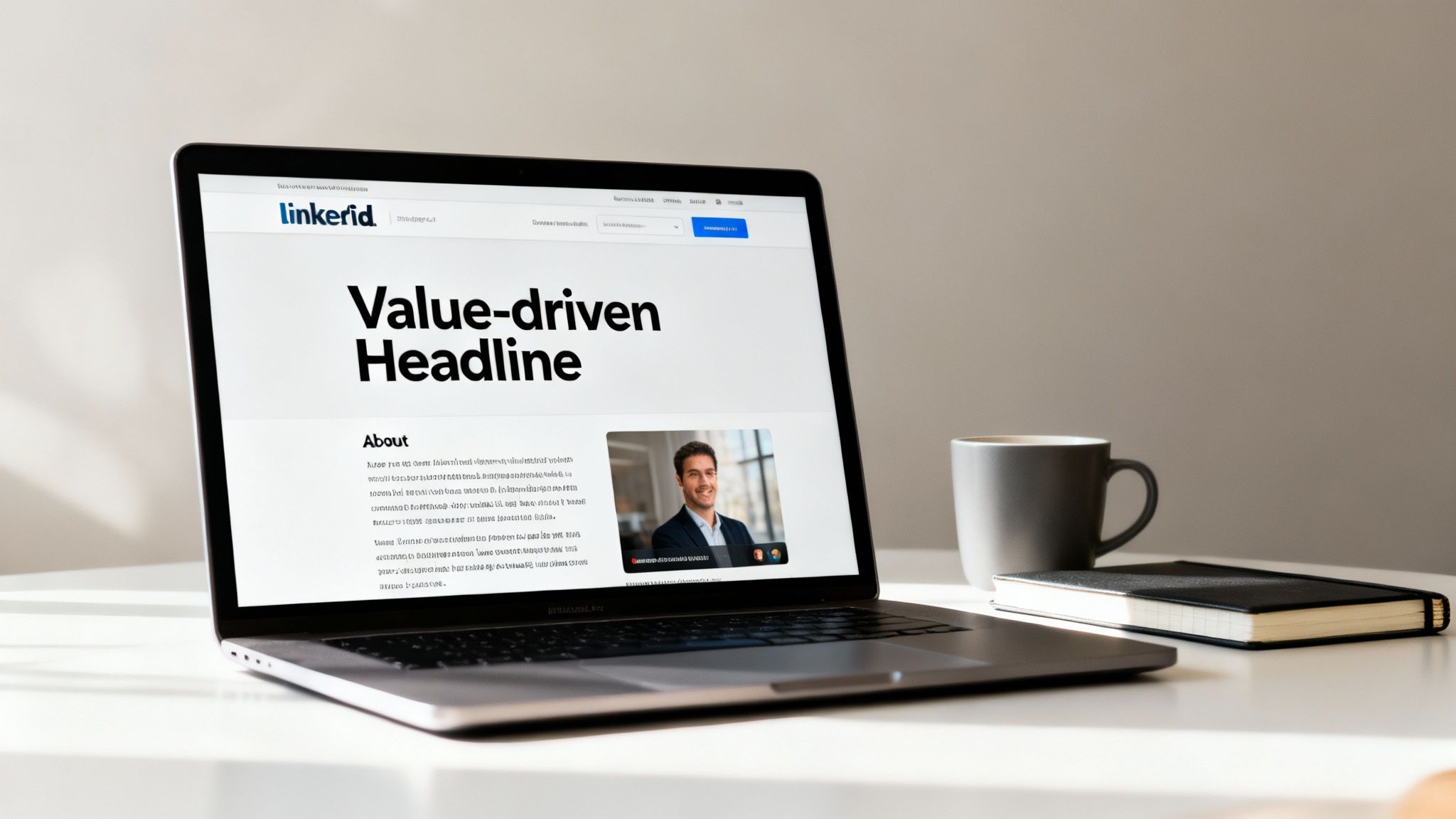
Think of your profile as the front door to your business. If it’s messy or unclear, people won't stick around. The data backs this up: fully optimized profiles can pull in up to 30% more weekly views. That's a steady stream of potential followers, clients, and partners you could be missing out on.
This first impression sets the tone for everything else you do. A weak profile undermines your credibility and makes it way harder for your content to land.
Craft a Headline That States Your Value
Your headline is the most valuable real estate on your entire profile. Don't waste it with a generic job title like "Founder at Company X" or "Marketing Consultant." That tells people nothing.
Instead, frame it as a value proposition. Who do you help, and what problem do you solve for them? This simple shift makes a world of difference.
- Before: Marketing Manager
- After: B2B SaaS Marketing Leader | Helping Tech Startups Scale with Demand Generation & Content Strategy
See the difference? The "after" version immediately tells visitors what you do, who you serve, and the results you drive. It’s an instant hook that makes them want to learn more.
Write a Compelling About Section
Your "About" section is your chance to tell a story, not just list skills. Nobody wants to read a sterile list of accomplishments. They want to connect with a person.
I’ve found this simple structure works wonders for making it scannable and impactful:
- The Hook: Kick things off with a strong statement about your mission or the big problem you're obsessed with solving.
- The Proof: Briefly mention a few key wins or experiences that build your credibility. Use bullet points here to break up the text and highlight your expertise.
- The Call to Action: End by telling people exactly how you can help them and what they should do next. A simple "Send me a connection request" or "Follow me for more content on X" works perfectly.
Your profile is the bedrock of your LinkedIn strategy. It has to clearly answer: who you are, what you do, and why anyone should listen to you. Without that clarity, even the best content will fall flat.
Showcase Your Best Work in the Featured Section
The Featured section is a seriously underrated tool. It lets you pin your best stuff right under your "About" summary, giving new visitors an immediate taste of the value you provide.
Don't let this space go to waste. Consider featuring things like:
- A link to your most popular newsletter.
- Your highest-performing LinkedIn post.
- A killer case study that shows off client results.
- A recent podcast interview or webinar you were on.
This curated portfolio proves your expertise on the spot and can turn a casual profile browser into a committed follower.
Mastering these foundational pieces is crucial. For a wider view on this, you can find more tips to increase your social media engagement that apply across different platforms. Once your profile is dialed in, every piece of content you create will have a much stronger launchpad.
Crafting Content That Captures Attention
Okay, your profile is looking sharp. Now for the main event: creating content that actually gets seen and talked about. This is where you shift from just having a LinkedIn presence to actively building a reputation and a community.
Great content on LinkedIn does more than just share information. It stops the scroll. It sparks real conversations. It proves you know your stuff. The goal here isn't just to post for the sake of posting, but to put things out there that people genuinely want to engage with.
Let’s break down how to turn a simple post into an engagement magnet, starting with the single most important element: the first line.
Master the Art of the Scroll-Stopping Hook
You have about three seconds to grab someone's attention in the feed. That's it. The first sentence of your post—the hook—is your one shot to convince them to stop scrolling and click "see more." A weak hook means your post is dead on arrival, no matter how brilliant the rest of it is.
I've found that the strongest hooks usually fall into a few battle-tested categories:
- The Contrarian Take: Go against the grain. Challenge a common belief in your niche. "Everyone says you need to hustle 24/7 to succeed. They're wrong."
- The Surprising Statistic: Hit them with a number they didn't see coming. "Only 8% of founders feel confident in their marketing. Here’s how to join them."
- The Relatable Problem: Start with a pain point that makes your audience nod in agreement. "That feeling when you spend hours on a proposal and get ghosted."
- The Personal Story: Open up with a vulnerable or interesting anecdote. "I almost quit my business three times. Here's what kept me going."
The hook has one job: earn you a few more seconds of attention. Get this right, and you've already won half the battle.
Structure Your Posts for Maximum Readability
Once you’ve hooked them, you have to keep them. Nobody on LinkedIn wants to tackle a massive wall of text, especially on a phone. The secret is making your content incredibly easy to scan and digest.
Think about creating a visual rhythm. Use short paragraphs—we're talking one to two sentences, max—and be generous with your line breaks. This creates white space that makes your post feel less like a textbook and more like an invitation to read.
A well-structured post guides the reader's eye, making it easy for them to pull out the key takeaways even if they're just skimming. Break up your ideas, use simple language, and let your content breathe.
This isn't just about making things look pretty. It’s about respecting your audience’s time. Clean formatting directly leads to higher engagement because you're making your message effortless to absorb.
Choose Content Formats That Drive Interaction
The format you choose for your content can make or break its performance. While a solid text-only post can work wonders, mixing things up keeps your feed interesting and appeals to how different people prefer to consume information.
Let’s look at some real-world performance. Choosing the right format can give you a massive visibility boost. For example, multi-image carousels often hit a 6.6% engagement rate, which crushes the platform average. Meanwhile, a standard text-only post usually hovers around 4%. It's a small change that makes a big difference.
To help you decide where to focus your energy, here’s a quick comparison of what’s working right now.
LinkedIn Content Format Performance Comparison
This table breaks down the different post formats and their typical engagement rates, giving you a better idea of where to prioritize your creative efforts.
| Content Format | Average Engagement Rate | Best For |
|---|---|---|
| Carousels (PDFs) | High (5-7%) | Telling a story, breaking down complex topics into simple steps, or showcasing a portfolio. |
| Text + Image | Medium (3-5%) | Adding visual context, sharing a personal photo to build connection, or using an infographic. |
| Polls | High (Varies) | Quickly gathering audience opinions, sparking debate, and starting a broad conversation. |
| Video (Native) | Medium-High (4-6%) | Sharing quick tips, telling a compelling story, or conducting short interviews. |
As you can see, there's no single "best" format—it all depends on your message and your audience. Experimenting is key. To get a feel for how these look in the wild, check out these excellent LinkedIn post examples and see these formats in action.
Craft Calls-to-Action That Encourage Real Comments
Every post needs to end with a clear call-to-action (CTA). But please, skip the lazy "what do you think?" It rarely works. A great CTA is specific and makes it easy for someone to leave a thoughtful reply.
Instead of those generic questions, try something more direct:
- Ask for a specific experience: "What's the best piece of career advice you've ever received? Share it below."
- Prompt a simple choice: "Are you Team A or Team B on this? Tell me why."
- Request advice for a situation: "If you were in this situation, what would be your first move?"
A strong CTA removes the friction from commenting and invites people into a specific conversation—which is the entire point. And when it comes to keeping that content pipeline full, don't be afraid to get some help from tools like AI-powered blog generating tools to streamline your drafting process.
Finding Your Ideal Posting Rhythm
Let’s be real: consistency is the engine of LinkedIn engagement. But consistency isn't about burning yourself out with three posts a day. It's about finding a sustainable rhythm that keeps you top-of-mind without torching your creativity.
An erratic schedule just confuses the algorithm and your audience, killing any momentum you build.
The goal isn't just to post often; it's to post smart. This means nailing down a cadence you can actually stick with long-term and hitting "publish" when your ideal audience is actually scrolling. A solid rhythm turns your content game from a frantic scramble into a repeatable system for growth.
Debunking the “Best Time to Post” Myth
You’ve probably seen those articles floating around, the ones claiming the magic window for posting is Tuesday at 10 AM. While they’re an okay starting point, that advice is completely generic. Your audience of freelance graphic designers in Europe keeps a totally different online schedule than C-suite execs in North America.
Instead of chasing universal advice, you need to find your golden hours. And the data is waiting for you, right inside your own profile.
LinkedIn Analytics is your best friend here. Head to your profile, click into your analytics, and take a hard look at your post impressions. You'll start seeing patterns—which days and times give your content the most initial pop. That’s the most reliable way to figure out when your specific audience is paying attention. For a deeper look, our guide on the best time to post on LinkedIn can help you make sense of the data.
How Often Should You Really Be Posting?
The next big question is frequency. Is daily posting the secret sauce, or is it all about quality over quantity? Honestly, the answer depends entirely on your goals and your bandwidth.
- For Rapid Growth (3-5 times per week): If your main goal is to build an audience and maximize reach—fast—then a higher frequency is the way to go. This keeps your profile buzzing and gives the algorithm more content to push out.
- For Steady Authority (2-3 times per week): If you're more focused on building deep trust and cementing your expert status, a slightly slower pace works great. It gives you the space to create more in-depth, high-value posts without feeling rushed.
The most effective posting frequency is the one you can stick to without your content quality taking a nosedive. Consistency with two great posts a week will always beat five mediocre ones. Start smaller than you think you can handle and build up from there.
The formats you choose also play a huge role in your rhythm. Just look at this breakdown of engagement between carousels and simple text posts.
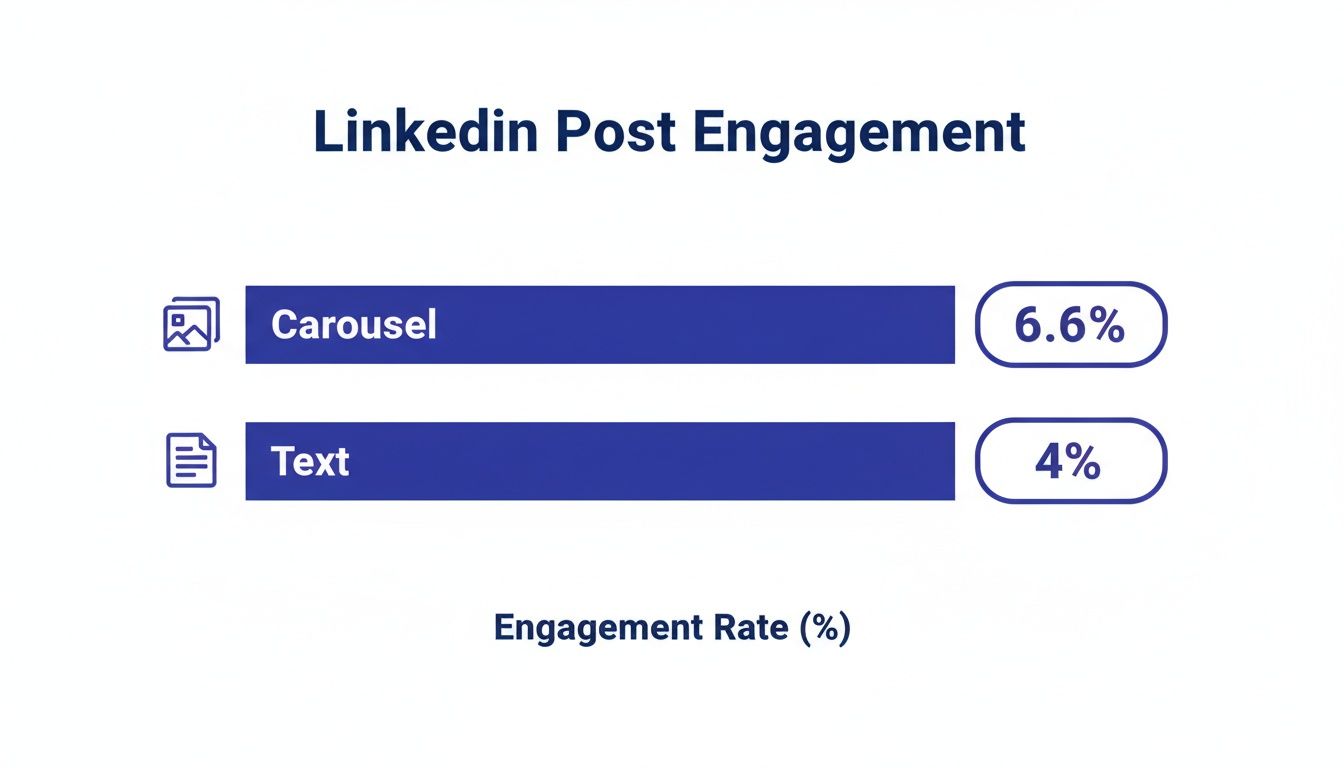
The data is pretty clear: carousels take more work, but they deliver a much bigger engagement punch than text posts. It just goes to show that putting a little more effort into quality formats really does pay off.
Building a System That Works for You
Maintaining consistency isn't about willpower—it's about having a solid system. Trying to come up with an idea, write a post, and publish it every single day is a direct path to burnout. The real key is to separate the different stages of creation.
Embrace Content Batching
Set aside a dedicated block of time each week or month just for content. It's a game-changer for focus and efficiency. Here’s a simple workflow to get you started:
- Ideation Session (1 hour): Brainstorm a messy list of topics, hooks, and stories. Don't write anything out, just get the ideas down.
- Drafting Session (2 hours): Take your best ideas and turn them into rough drafts. The goal here is just to get the core message out, not to make it perfect.
- Refining & Scheduling (1 hour): Polish your drafts, add visuals or formatting, and load them into a scheduling tool.
This batching process completely removes the daily pressure of "What should I post today?" You’ll have a library of content ready to go, freeing you up to spend your daily LinkedIn time on what really moves the needle: engaging with your community.
Driving Engagement Beyond Your Own Posts
If you think creating great content is the whole game on LinkedIn, you're missing the single biggest growth lever on the platform: community participation.
Simply posting and walking away is a rookie mistake. Real engagement is a two-way conversation, and it mostly happens in the comments of other people's posts. This is where you build trust and social capital, signaling to the algorithm that you’re a valuable, active member of the community.
Master the Art of the Thoughtful Comment
Let's be clear: dropping a "great post!" or "thanks for sharing!" comment does absolutely nothing for you. It’s the digital equivalent of a polite nod—forgettable and adds zero value.
Your goal is to leave comments that are so insightful they stop the scroll and make people think, "Who is this person?" A high-value comment should do one of three things:
- Add a new perspective: Share a related experience or a different viewpoint that builds on the original idea.
- Ask a clarifying question: Pose a thoughtful question that encourages the author and others to dig deeper.
- Provide additional value: Link to a helpful resource or share a quick tip that complements the post's main point.
Let’s say a marketing leader posts about a killer campaign. Instead of a generic compliment, try something like: “This is a brilliant breakdown. We saw a similar 20% lift when we applied this framework to our SaaS onboarding emails, but found that Step 3 needed a slight tweak for a B2B audience. Did you run into that as well?”
See the difference? That comment immediately positions you as a knowledgeable peer, not just a bystander.
A Daily Routine for Proactive Engagement
Consistency is everything. You don’t need to live on LinkedIn, but a focused 15-20 minute routine can yield incredible results over time. It’s the most effective way to boost engagement without burning out.
Here’s a simple workflow I use:
- Your Feed First (10 mins): Scroll your home feed and leave 3-5 thoughtful comments on posts from your network. I prioritize content from industry leaders, potential clients, and my most active connections.
- Explore Hashtags (5 mins): Follow 3-4 key industry hashtags (#B2Bmarketing, #startups, #saas, etc.). This is my secret weapon for finding new voices and conversations outside my immediate circle.
- Pop into Groups (5 mins): Identify one or two active, high-quality LinkedIn Groups in your niche. I jump in a few times a week to answer questions and contribute—but I steer clear of groups that are just a wall of self-promo links.
Proactive engagement is like planting seeds. Every thoughtful comment and helpful reply is an opportunity to build a new connection, attract a follower, or establish your authority. It's the slow, steady work that builds a powerful and loyal community around you.
Turning Connections Into a Community
The opportunity on LinkedIn is massive. With 1.2 billion members and 40% of users engaging with a page every single week, your consistent efforts have a direct line to a highly active professional audience. We're talking over 2 billion monthly interactions between members and pages. The audience is there, and they're ready to connect. You can dig into more of these LinkedIn user statistics on sproutsocial.com.
As you keep showing up, you’ll start to see the same people in the comments. These are your people. Nurture those relationships. If someone leaves a great reply to your comment, thank them and ask a follow-up. If you see someone consistently sharing gold, send a personalized connection request mentioning a specific post you enjoyed.
This is how you transform your network from a static list of contacts into a dynamic community of peers and clients who know you, like you, and trust you—all because you consistently showed up and added value.
Using Analytics to Refine Your Strategy

Posting consistently and jumping into conversations is a massive part of the puzzle. But if you’re not tracking what’s actually working, you’re just guessing. A data-driven approach turns your efforts from random shots in the dark into a calculated strategy that gets sharper over time.
This is where LinkedIn’s own analytics tools become your secret weapon. They tell you exactly what your audience responds to, helping you double down on your wins and stop wasting time on content that falls flat.
Decoding the Key Engagement Metrics
When you first open up your analytics, it can feel a little overwhelming. Let's cut through the noise. For refining your strategy, you only need to focus on a few core metrics.
Here are the big three you need to watch:
- Impressions: This is simply the number of times your post appeared in someone's feed. High impressions are a good sign the algorithm is picking up your content, but it's just the start of the story.
- Click-Through Rate (CTR): This metric shows the percentage of people who saw your post and clicked on it—whether to hit "see more," visit a link, or check out your profile. A strong CTR tells you your hook is doing its job.
- Engagement Rate: This is the golden metric. It’s the total number of interactions (likes, comments, shares) divided by your impressions. A high engagement rate means your content truly connected with the people who saw it.
Getting a handle on these key social media engagement metrics is fundamental. It moves you beyond vanity numbers and into the realm of actionable insights.
Identifying and Analyzing Your Top Performers
Your best content leaves clues. Your job is to play detective and figure out why those posts were so successful. This is the most direct path to learning what makes your specific audience tick.
Set aside some time once a month to do a quick content review. Dive into your analytics and pull your top 3-5 posts based on engagement rate.
Don’t just look at what posts did well—dig into why they did well. Was it the personal story you told? The contrarian hook you used? The carousel format that broke down a complex idea? This analysis is where your future home-run content ideas are born.
For each winning post, ask yourself these questions:
- What was the topic? Did you hit on a common pain point, a trending industry topic, or a personal milestone?
- What was the format? Was it a text-only post, a carousel, a poll, or a video?
- What was the hook? How did that first line grab attention and pull people in?
Answering these questions consistently will reveal the patterns in what your audience loves. You’ll start to see a clear roadmap for creating more of what works.
Doubling Down on What Works
This data-driven feedback loop is what separates the pros from the amateurs. Armed with these insights, you can build a content plan that has a much higher chance of success. Your analysis might show that your audience loves your behind-the-scenes stories or that they find your step-by-step carousels incredibly valuable. Now you know what to create next.
The numbers don't lie. LinkedIn’s median engagement rate jumped from 6.00% to 8.01% in just one year—a massive 33.35% increase. This signals that the audience is more receptive than ever to quality content, and a refined strategy allows you to capture that attention.
This process ensures your efforts aren't wasted. You’ll spend less time creating content that misses the mark and more time building a genuine connection with your audience through posts you know they actually want to see.
Your Top LinkedIn Engagement Questions, Answered
Alright, you've got the basics down. Your profile is sharp, you're creating content, and you're making the rounds in the comments. But as you dig deeper, the little tactical questions start to pop up. It's these details that separate a decent LinkedIn strategy from one that actually gets results.
Let's tackle the common hurdles and "what-if" scenarios that come up when you get serious about growing on LinkedIn. Think of this as your field guide for the finer points of the platform.
How Should I Use Hashtags Without Looking Spammy?
This is a big one. We've all seen those posts drowning in a sea of irrelevant hashtags. It's an instant turn-off and screams "spam." The real goal with hashtags isn't to game the system; it's to help LinkedIn categorize your content and show it to the right people.
A good rule of thumb is to stick to 3 to 5 highly relevant hashtags per post. That’s the sweet spot for boosting discoverability without looking desperate or cluttering up your message.
Here’s a simple framework I use for picking them:
- One broad industry tag: Think high-level, like #B2Bmarketing or #SaaS.
- Two niche tags: Get specific to your post's topic, like #demandgeneration or #contentstrategy.
- One community or personal tag: This could be your branded hashtag or one for a community you're active in, like #startuplife or #buildinpublic.
Mixing broad and niche tags gives your content the best shot at being seen by the right audience, all while keeping your post clean and professional.
What Is the Right Way to Tag People in Posts?
Tagging people can give your post an initial kick, but you have to do it right. When you tag someone, they get a notification, which often prompts a quick like or comment that signals to the algorithm that your post is worth showing. But if you get it wrong, you’re just being annoying.
Only tag people who are genuinely part of the conversation. That means you mentioned them, quoted their work, or you're asking a question they are uniquely qualified to answer. Never, ever tag a list of influencers just hoping for attention.
For instance, if you're sharing a killer takeaway from a conference, it's totally cool to tag the speaker. If you’re building on an idea another creator shared, tag them and give them credit. This is about genuine collaboration, not cheap reach. Thoughtful tagging builds relationships; spammy tagging burns bridges.
How Long Does It Realistically Take to See Results?
This is the million-dollar question, and the honest—if slightly frustrating—answer is: it depends. Building a real presence on any platform is a marathon, not a sprint. You won't post three times and wake up to a massive, engaged following.
But you can expect to see progress in stages:
- First 30 Days: You'll likely see an uptick in profile views and a few more connection requests. Engagement will be small, but you're laying the foundation.
- 90 Days In: With consistent effort, you should notice a clear increase in followers and more regular engagement. You’ll start recognizing the same faces in your comments—that's the start of a real community.
- 6+ Months: By now, you should have solid momentum. You'll know what kind of content resonates, and you might even start seeing inbound leads or opportunities coming straight from your LinkedIn activity.
Consistency is everything. Showing up 3-4 times a week with good content and spending 15 minutes a day engaging with others will compound much faster than you’d think.
What’s the Best Way to Repurpose Content for LinkedIn?
You don’t have to create something from scratch every single day. Repurposing is one of the smartest ways to stay consistent without burning out. The trick is to adapt your content for LinkedIn's context, not just copy-paste it.
Here are a few proven ways I like to repurpose content:
- Blog Post to Carousel: Pull the key takeaways from a long-form article and turn them into a slick, visual carousel. Each slide can be a main idea, a powerful stat, or a single step in a process.
- Podcast/Video to Text Post: Grab a powerful quote or a short, impactful story from an audio or video clip. Frame it with a personal reflection and end with a question to get the conversation started.
- Webinar to a Tip Series: Break down a webinar into a series of 3-5 separate posts. Each post can focus on one actionable tip, giving you a full week's worth of content from a single event.
Repurposing isn't lazy; it's efficient. It lets you squeeze maximum value from every piece of content you create and makes sure your best ideas reach the widest audience possible.
Ready to stop guessing and start growing on LinkedIn? PostFlow is your AI content strategist. Our platform helps you turn your unique expertise into consistent, high-quality posts that build your brand and attract opportunities. Learn how PostFlow can streamline your entire LinkedIn workflow today.